
Families and students
How do I read my child’s results on their home screen?
Written by the TestFLE team.
In short
The student’s “Home” screen sums up their last test: seven skills, radar, global level and results curve. It fills in after the first completed test, never with a cancelled test.
Who this is for, and what you need first
- Who this is for
- Families and students who want to understand the results screen after a placement test.
- What you need first
- At least one test completed by the student.
- The student’s account, open on a computer, a tablet or a phone.
The steps
- Sign in to the student’s account.
- In the menu, click “Home”.
- On the left, read “My last results”: each skill has a level.
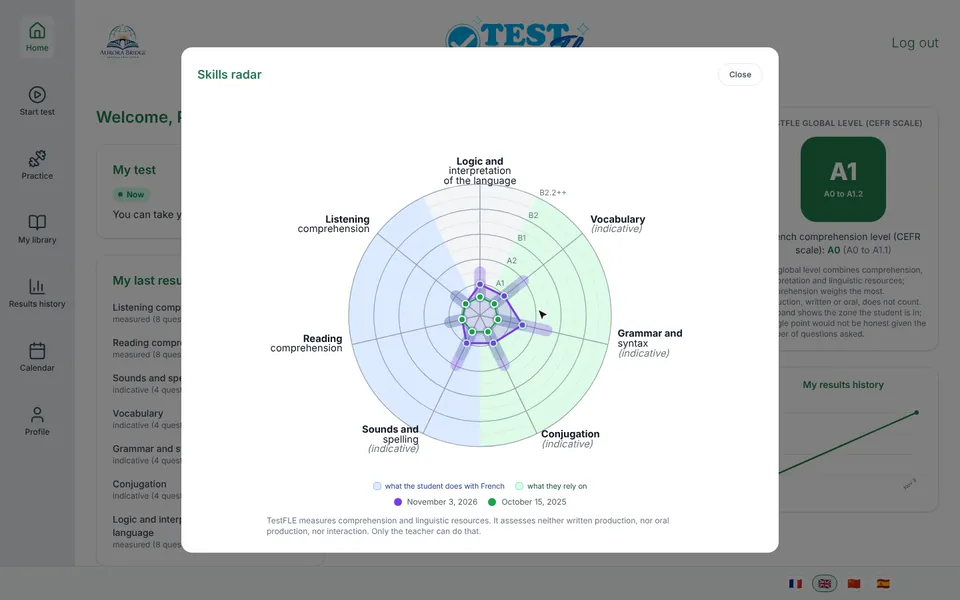
- In the centre, look at the “Skills radar”.
- Click the radar to enlarge it, then click “Close”.
- On the right, read the global level, then the “My results history” curve.
What each block shows
- My test, at the top left, says in one sentence what the student can do with their test for now. The article when to take the test goes through these sentences.
- My last results lists the seven skills: “Listening comprehension”, “Reading comprehension”, “Sounds and spelling”, “Vocabulary”, “Grammar and syntax”, “Conjugation” and “Logic and interpretation of the language”. Each one has a level (for example A2.1), the range in which the student sits (for example “A2.1 to A2.2”), and a state followed by the number of questions, such as “measured (12 questions)”.
- Skills radar draws these seven levels on a single chart. Under the drawing, two legends name the two sides: “what the student does with French” and “what they rely on”.
- TestFLE global level (CEFR scale) is the badge on the right: the letter in large type, the range in small type below. The line “French comprehension level (CEFR scale)” completes it. Understanding the global level explains these two levels.
- My results history is a curve that keeps the last ten levels. For the full list of tests, open “Results history” in the menu (see the results history).
On a phone, the blocks are stacked one under the other, in the same order.
Going further
Understanding the home screen
What do “measured”, “indicative” and “not assessed” mean?
These three words say how many questions were used to place the student in a skill. The word “measured” means the skill received enough questions to measure the level. The word “indicative” means it received few: the level gives a direction, to be read with caution. The words “not assessed” mean that no level could be established in this skill.
The number of questions is written next to the state. A skill marked “not assessed” is not a failure on the child’s part: it is a limit of this test, for example when it is taken without reading (see below). The short definitions of these words are also in the glossary.
How do I read the radar?
The radar places each skill on an axis. The further the point is from the centre, the higher the level. The shape of the drawing shows which skills are more or less advanced.
When the student has taken at least two tests, the radar of the previous test is laid over it in a second colour, provided neither of the two is an older result (see below). The legend says which test each colour stands for.
A click on the radar enlarges it in a window. The “Close” button closes it again.
What is the curve for?
The “My results history” curve shows how the level changes from one test to the next. It keeps the last ten levels. A click enlarges it, and in the enlarged window, hovering over a point shows its date and its level (“Date: …” then “Level: …”).
A test stopped a little early, or taken without reading
Under the global level, a yellow box may show a note. There are two for families:
- “The test stopped a little early, because the end was becoming difficult. The results are given with caution. They can be refined another time.”
- “This test was taken without reading. Reading was not assessed. The other results are given from a small number of questions: they indicate, they do not measure yet.”
The first is explained in understanding the global level, the second in the no-reading test.
What the Home screen does not show
The Home screen never shows a cancelled test. A cancelled test has no end date and no result: it does not count in any of the blocks above.
It does not show what is reserved for the teacher either: the hypotheses to check in class, the gaps between skills, how the test went. TestFLE does not send them to the student’s area. Part of this information appears in the learning report the school can give you: see reading the PDF report.
An older result
A test taken with the previous TestFLE engine is shown as it was recorded, with the note “Result produced by the previous engine, before the seven-skill radar: one level per skill as recorded at the time, without an uncertainty band. It has not been converted.” So it has no range and no state per skill.
If the Home screen does not appear
- While it is loading, the screen says “Loading your results…”.
- If loading fails, it says “We could not load your dashboard. Please try again later.” Refresh the page, then try again a little later if the message comes back.
Related articles
- What do the global level, the band and the steps (A1, A2, B1) mean?TestFLE places the student on nine steps from A0 to B2.2, plus one step beyond, which extend the CEFR levels. The result is a range, the band, and not a single point.
- Where can I find all the tests my child has taken?The student’s “Results history” lists their last 50 tests, from the most recent to the oldest, with the date, the final level and the level of each skill. It also shows cancelled tests and tests in progress.
- How do I read the learning report given by the teacher?The learning report is a three-page PDF that the teacher or the school office produces after a test, then gives to you. It gives the level, the radar, the seven skills and some leads.
- How does the test work for a child who cannot read yet?When the school marks a child as a “Non-reader”, they take a form of the test in which every question can be done without reading. The results say so, and reading comprehension is not assessed.