
Families and students
How long does the test last, in lightning mode or in precise mode?
Written by the TestFLE team.
In short
The teacher chooses the mode of your child’s test: lightning, with one minute per question and 35 minutes at most, or precise, with no timer. The “Start test” screen announces the mode before the test starts.
Who this is for, and what you need first
- Who this is for
- Families and students who want to know how long the test lasts and whether the questions are timed.
- What you need first
- An open test, that is, the “Now” badge on the “My test” card on the Home page: a test that is only announced does not let you in yet.
The steps
- Click “Start test” in the menu.
- Read the sentence about the length of the test, at the bottom of “How it works”.
- If it mentions 35 minutes, the test is in lightning mode.
- If it says the questions are not timed, the test is in precise mode.
- Click “Start the test” when your child is ready.
The two possible sentences are “The test lasts at most 35 minutes, with at most one minute per question.” (lightning mode) and “The test takes as long as you need: the questions are not timed.” (precise mode). The first step of the instructions also changes with the mode.
The two modes
- Lightning mode. Each question lasts one minute at most, and a disc in the corner of the screen shows the time left. The whole test lasts 35 minutes at most.
- Precise mode. No question is timed: your child takes their time. The test does not stop after a set number of minutes. When it is taken with the class, it stops at the session’s end time.
You do not choose the mode, and neither does your child: the teacher sets it when they open the test. If a timer bothers your child, talk to the teacher before the session starts. The mode is fixed when the test starts: a test that has already started keeps its mode, even if the teacher then changes the session.
Going further
Understanding the settings and special cases
Lightning mode, question after question
The time disc is at the top right of the question. It carries no numbers and empties like a clock, so a child can read it without knowing how to read. It turns red in the last ten seconds. On a small screen, it stays in the corner while the top buttons wrap onto another line.
When the question includes a recording, the minute only starts when the recording ends: the disc stays full while it plays. If the recording never ends, for example because it does not start, the minute starts anyway after three minutes. When several questions are about the same recording, the minute of the following questions starts straight away.
When the minute is up, the screen acts for your child.
- If they had chosen an answer, it is sent as if they had clicked “Next”.
- If they had chosen nothing, the question is skipped and counts as a wrong answer.
The second case happens even when the “Skip” button is not part of the session: that setting changes nothing at the end of the minute.
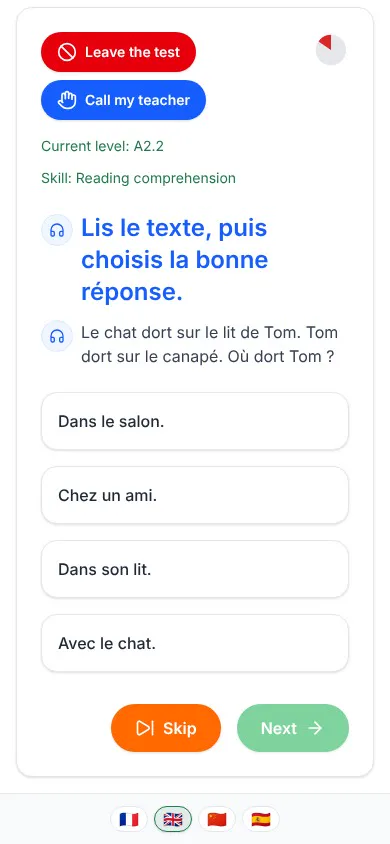
The 35 minutes of lightning mode
When 35 minutes have passed, the test stops as soon as the current question gets its answer, and the screen shows “The time set for the test is over. Here are your results.”. If the test stops earlier because the level is established, the screen shows “Your level has been determined. Here are your results.”.
Time spent paused does not count towards the 35 minutes. If the teacher has to restart the test (see Why is my child’s test paused?), the minute of the question resumes where it had stopped.
At the end time of a class session, a lightning test that has already started is not cut off: it runs to its end, and it cannot go beyond its 35 minutes. However, once the session is over, nobody can start the test with the class any more.
Precise mode, with no timer
There is no disc, and no question ends by itself. Precise mode usually asks more questions than lightning mode, so that each level rests on more answers. The test therefore lasts longer, but your child is never rushed.
The end of the class session is the only time limit. In the last ten minutes, a banner at the top of the screen gives a warning:
- “Careful, your test ends in less than 10 minutes.”
- “Careful, your test ends in less than 5 minutes.”
- “Careful, your test ends in less than one minute.”
At the end time, the test stops and the screen shows “The session is over. Here are your results.”. The banners and the stop only apply to a test taken with the class. A student who takes the test with an individual opening, like Colibri Corail, a student in CE1 Bleuets, sees none of them.
Where the mode appears afterwards
The “Test finished” screen recalls the mode of the test under “Test mode”. The words change with the language of the screen: “éclair” and “précis” in French, “lightning” and “precise” in English, “relámpago” and “preciso” in Spanish, 闪电 and 精确 in Chinese. For the terms used in this article, the glossary gives a definition.
Related articles
- What does my child see during the test?Your child first reads a welcome screen, then answers one question at a time, with four buttons, a skill and a current level. The questions always stay in French, whatever the language of the screen.
- What are the test buttons for: Next, Skip, Call, Leave?“Next” sends the answer, “Skip” skips the question, “Call my teacher” alerts the teacher and “Leave the test” cancels the test. The “Skip” button only exists if the teacher has turned it on for the session.
- Why is my child’s test paused?In class, a student who leaves the test page sees the “Your test is paused.” screen appear, and only their teacher can restart the test. The same question then comes back, with the time that was left and all the answers already given.
- What do the words used in TestFLE mean (step, band, lightning mode…)?This glossary explains, in one to three sentences, the words students and their families come across in TestFLE, from step to lightning mode. It also links the student’s words to the teacher’s.